
v4.1.0 rework: Egypt was rebuilt in BIG UPDATE 4.1.0. Treat spots below as Needs Retest.
Guide confidence: Community scouting after v2.7.0 plus glow notes for v2.9.0 — may be stale until re-verified post-rework.
The official Egypt stage is a temple-ruins map: warm sandstone corridors, carved hieroglyph walls, and a Golden Tomb Room with reflective accents. Hiders win on matte stone; seekers win when they flashlight-sweep gold specular mismatches.
1. Map overview
| Role | Advantage |
|---|---|
| Hider | Repeating sandstone + glyph lines break silhouettes; pillar slots are deep |
| Seeker | Warm lighting + gold trim creates easy specular tells; corridors are linear |
Prefer official Egypt over heavy Workshop maps on low-end PCs — see Low-End PC Settings.
2. Zone ratings
| Zone | Hider safety | Seeker priority | Notes |
|---|---|---|---|
| Golden Tomb Room | Medium | High | Gold accents; wrong metallic = instant tag |
| Main Corridor | High | Medium | Hieroglyph wall slots (Spot 2) |
| Outer courtyard / pillars | Medium | Low–Medium | Standing pillar poses; check after indoor clears |
3. Top 3 hider spots
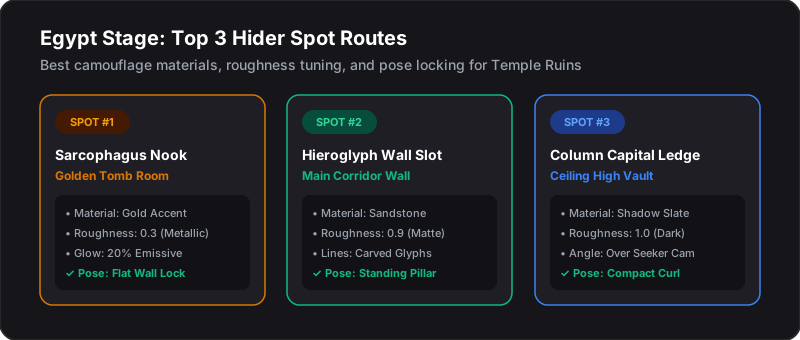
Spot 1 — Sarcophagus Nook (Golden Tomb Room)
- Material: Gold accent sample · roughness ~0.3 · optional glow ~20% (v2.9.0)
- Pose: Wall-Flat / Flat Wall Lock
- Tip: Keep brightness low — gold already reflects flashlight beams
Spot 2 — Hieroglyph Wall Slot (Main Corridor)
- Material: Sandstone · roughness ~0.9 matte · carved glyph line accents
- Pose: Standing Pillar / Wall-Flat
- Tip: Match glyph line direction; no glow paint here
Spot 3 — Column Capital Ledge (Ceiling High Vault)
- Material: Shadow slate · roughness ~1.0 dark matte
- Pose: Compact Curl
- Tip: Sit above common seeker camera height — angle over hallway traffic
Paint workflow: Painting Basics · glow tips: Advanced Painting.
4. Seeker sweep order
- Golden Tomb Room — flashlight gold trims for shine mismatches
- Main Corridor — walk the hieroglyph walls (collision check slots)
- Courtyard pillars — crouch-sweep bases before declaring clear
Use Seeker Checklist and Route Planner for timed clears.