MecchaGuide mascot — chameleon with paint dial and controller MecchaGuide

Search by symptom, map name, or update version · Ctrl+K

Last verified: v4.1.0 Official patches

Meccha Chameleon Paint Bug — White Glow Fix (v2.9.0)

Fix camouflage that glows white or looks overexposed under Lumen. Includes v2.9.0 glow-paint brightness tips so emissive hides do not look like lanterns.

By MecchaGuide Editorial Published Updated · verified v4.1.0

Quick answers

Why does my paint glow white under the seeker flashlight?

Usually wrong roughness (too shiny), sampling a lit hotspot, or glow-paint brightness set too high on a matte wall. Re-sample from a neutral mid-tone and lower brightness / raise roughness.

Is white glow the same as v2.9.0 glow-in-the-dark paint?

No. Glow paint is intentional emissive camouflage with a brightness slider. White-glow bug means your body looks overexposed on normal surfaces — turn brightness down or switch back to standard matte paint.

Symptoms

  • Body glows bright white after painting
  • Camouflage visible from across the room
  • After v2.9.0: intentional glow paint looks like a lantern because brightness is too high
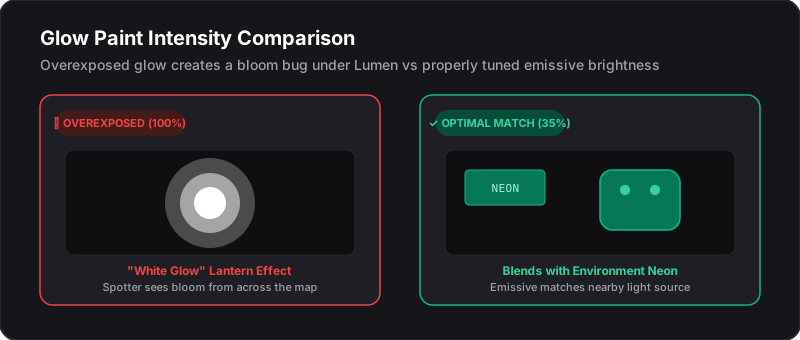
Overexposed white glow lantern vs optimal glow paint intensity comparison

Fixes

  1. Re-sample color from a neutral mid-tone surface — not light hotspots or neon.
  2. Raise roughness for drywall/fabric; avoid max metallic unless the prop is metal.
  3. If using glow / glow-in-the-dark paint (v2.9.0+): lower the brightness slider until you match nearby LEDs/neon — not open walls.
  4. Toggle see-through drawing view (key 3 on default layouts).
  5. On Workshop maps, retest after lighting changes.

Full paint workflow: Painting Basics. Neon / emissive tactics: Advanced Painting.

Related Guides