
Pool Room Workshop Map Guide
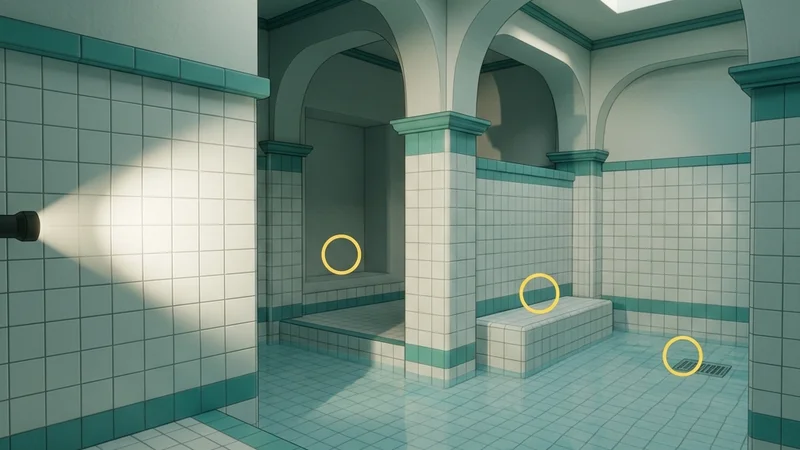
The Pool Room Workshop map is a medium-sized, hauntingly beautiful level heavily inspired by the “liminal space” and “Backrooms” aesthetic. The map consists of interconnected chambers filled with shallow, crystal-clear water, white tiled walls, square arches, and cool fluorescent lighting. The sheer monotony of the white and teal tile grids, combined with the refracting water surfaces, makes it one of the most mechanically demanding and visually disorienting arenas for both hiders and seekers.
This guide provides a comprehensive breakdown of the map’s layout, strategic hiding spots, and seeker clearing routes to help you navigate these eerie, flooded halls.
Map Overview & Layout Analysis
The Pool Room is structured as a series of repeating, interconnected chambers with varying water depths and pillar configurations:
                            POOL ROOM MAP LAYOUT

       +-------------------------------------------------------------+
       |                      [Deep Diving Pool]                     |
       |                    (Submerged Column Grid)                  |
       +-------+--------------------+--------------------+-----------+
       |       |                    |                    |           |
       | [Dry  |  [Shallow Pool A]  |  [Shallow Pool B]  | [Locker  |
       | Alcove|  (Repeating Arches)|  (Ladder Alcoves)  |  Rooms]   |
       |       |                    |                    |           |
       +-------+--------------------+--------------------+-----------+
       |                     [The Central Atrium]                    |
       |                   (Large Skylight & Columns)                |
+-------------------------------------------------------------+- Deep Diving Pool: A large, fully submerged room on the north side with thick concrete pillars. Hiders can sink to the bottom or stick to the submerged base of the columns.
- Shallow Pool A & B: These rooms feature water at ankle height. The ceiling is supported by square arches, creating abundant shadow gradients.
- Dry Alcove: A rare dry platform in the corner. Features benches, ventilation grates, and drain channels.
- Locker Rooms: A small, enclosed maze of tiled cubicles, white benches, and open doorways on the eastern edge.
How to Subscribe Safely
To prevent connection drops, version mismatches, or Steam client freezes when loading custom maps, follow this safety checklist:
- Use the Steam Client: Go to the official Meccha Chameleon Workshop on Steam, search for “Pool Room,” and click the green Subscribe button.
- Download Isolation: Do not download other workshop maps concurrently. Downloading multiple packages at once can trigger Steam’s API rate limits.
- Local Lobby Test: Before hosting a multiplayer session, launch the game, create a private lobby, select the Pool Room map, and boot it alone. This allows the game to compile the map’s shaders locally without network stress.
- Avoid Third-Party Packs: Never download
.pakfiles from unverified Google Drive or Discord links. These bypass Steam’s built-in file verification and can introduce security vulnerabilities. If you encounter any installation freezes, consult our Workshop Mod Safety Guide.
Detailed Hider Strategies
1. Water Tile Pattern Grid Alignment
The repeating square tiles are a hider’s greatest weapon. By aligning your body lines to match the tile seams, you can completely disappear.
- Positioning: Stand flush against a flat wall, preferably near a corner where the light is diffuse.
- Pose: Use the standing or crouching pose. Align your shoulders and hips parallel to the wall.
- Painting: Sample the tile color (typically off-white or teal). Use the fine-line paint brush to draw horizontal and vertical dark grey lines at regular intervals on your body, matching the exact spacing of the grout lines on the wall.
- Reflectivity: Set roughness to
0.3and metallic to0.0. Since ceramic tiles have a slight sheen, a tiny amount of specularity is acceptable, but too much will make your character glow under flashlight sweeps. Refer to the Painting Basics Guide for brush stroke tips.
2. Ladder & Gutter Blends (Dry Alcove)
The ladders leading out of the pool and the floor drainage grates are dark, detailed structures.
- Positioning: Stand directly behind a chrome pool ladder.
- Painting: Paint your lower body dark grey (matching the drain/gutter tiles) and your upper body a reflective metallic silver (roughness 0.1, metallic 0.9) to match the chrome rails of the ladder.
- Result: A seeker scanning the room from a distance will assume your silver torso is simply part of the ladder piping.
3. Submerged Visual Refraction (Deep Diving Pool)
Water in Meccha Chameleon uses a dynamic refraction shader that distorts the visual shape of anything underneath.
- Positioning: Dive into the deep diving pool and press yourself against the base of a pillar.
- Camouflage: Paint yourself dark blue-green to match the deep water fog.
- Result: Because the seeker looking down from above has to peer through the rippling surface of the water, the refractive distortion makes your silhouette appear warped and unrecognizable, breaking the standard human silhouette.
Seeker Counters
1. Ripple and Splash Detection
Hiders who move or adjust their paint colors inside the water will generate physical ripple rings on the surface.
- Observation: Scan the surface of the pools from an elevated arch. If you see concentric circular ripples emanating from an empty area, shoot the center of the ripple.
- Melee Sweep: Run through the shallow pools. The collision of your feet with a hidden hider will make a distinct sound and block your path.
2. Flashlight Specular Checks
Fluorescent tube lights cast a uniform glow, but your high-power seeker flashlight casts a dynamic directional light.
- Action: Shine your flashlight directly at suspect tiled walls from a side angle.
- Detection: If a hider is standing against the wall, their model’s shadow will cast onto the tiles behind them, breaking the flat, clean look of the wall. Additionally, if the hider’s paint roughness is not configured correctly, they will reflect your flashlight beam with a different specular highlight than the surrounding ceramic tiles.
- If you experience lag while playing on this map, review the optimizations in the Steam Deck Hider Tips or look at the Compatibility Index for configuration profiles.
Platform Compatibility & Performance (CVL)
- Steam Deck: Rated Stable. The map performs well at a locked 40 FPS, though the water reflections can drop frames if resolution scaling is set to 100%. Set reflections to Medium.
- Mac OS (CrossOver): Rated Playable (with tweaks). Ensure DXVK is active if you experience rendering errors with the water transparency.
- Check the full Pool Room Compatibility details for specific hardware benchmarks.